Every October the same thing happens in my town. The forecast turns dry, the utility posts a wildfire mitigation map, and my neighbors start asking what to buy. Most of them come home with a 2,000Wh box that weighs 50 pounds and sits in a closet until the next power drop, because nobody did the load math first. A portable power station backup is not a purchase. It is a small system you size, wire, test, and then leave alone until you need it.
I have been an electrician for 12 years, run a solar install side business out of Salida, Colorado, and keep a Kill A Watt meter and a paper logbook on the bench. Every claim I make about runtime has a number behind it, and the number comes from a meter, not a spec sheet.
Here is the whole job, in the order I do it.
Why you should trust me
I spent 12 years pulling wire before I started installing solar and reviewing power gear full time. My house sits at 7,000 feet where the grid drops for days during wildfire season, and my 2004 Sprinter van has a 12V system I wired myself. I have put more than 30 power stations through discharge cycles over the last five years. I do not test a unit without a real AC inverter, I will not recommend one I have not discharged at least three times, and I disclose every free sample. A power station's spec sheet is a promise. The meter is the truth.
How I size and check a station before it goes in the closet
The method is boring and it works.
First, I measure the load. Not the label, not the marketing copy, the actual draw at the wall with a meter.
Second, I convert that draw into watt-hours, because watt-hours are what you are buying. Watts tell you what the inverter can push at once. Watt-hours tell you how long it can push it.
Third, I look for LiFePO4 chemistry, a pure sine wave inverter, and controls that work from the front panel without an app. The app is a feature, not the product. If a unit cannot run from its own buttons, it fails my bench.
Fourth, I check the fan behavior under load and the pass-through behavior while charging. A station that screams at 200W is a station you will not use in a bedroom, and a station that cannot pass power through while plugged in is a station you will unplug every time the power blinks.
Step 1: Measure the real load
Write down what you actually want running during an outage. Not the whole house. The short list. For most people that is a phone or two, a laptop, a couple of LED lamps, a router or modem, and maybe a CPAP machine.
Plug each one into a Kill A Watt meter or a plug-in energy monitor and read the watts. Typical nameplate values to sanity-check against: a phone charger pulls 5 to 10W, an LED lamp 8 to 12W, a laptop 45 to 65W, a cable modem and router together 15 to 25W, a CPAP without humidifier 30 to 60W, and a full-size fridge compressor cycling on and off 100 to 200W while it runs.
The fridge is the one that trips people up. It does not draw a steady number. The compressor surges on, runs, then shuts off, so its duty cycle matters as much as its running watts. My rule: unless you have measured the fridge, leave it on grid power and size the station for the small loads.
Total the watts. A phone, a lamp, a laptop, and a CPAP land around 100 to 150W running at the same time. That is the number you build from.
Step 2: Turn watts into watt-hours
Watt-hours are watts multiplied by hours. If your small-load list draws 120W and you want it running for six hours, you need 720Wh of usable energy.
Now add inverter losses. A pure sine wave inverter burns roughly 10 to 15% of what it pulls, so divide your total by 0.85 to get the battery capacity you need. That 720Wh becomes about 850Wh of nameplate capacity.
Then check the surge rating, not the headline number. Anything with a motor has an inrush current. A fridge compressor or a furnace blower can pull three to five times its running watts for a fraction of a second. If a station's listing leads with a surge number, find the sustained inverter rating too, because that is the number that decides whether a motor starts or the unit trips into protection.
Two more checks that save money later. Confirm the chemistry is LiFePO4, which gives you far more charge cycles than the older lithium-ion packs, and confirm the USB-C port does the wattage you need for a laptop, since a 100W PD port can replace a whole power brick.
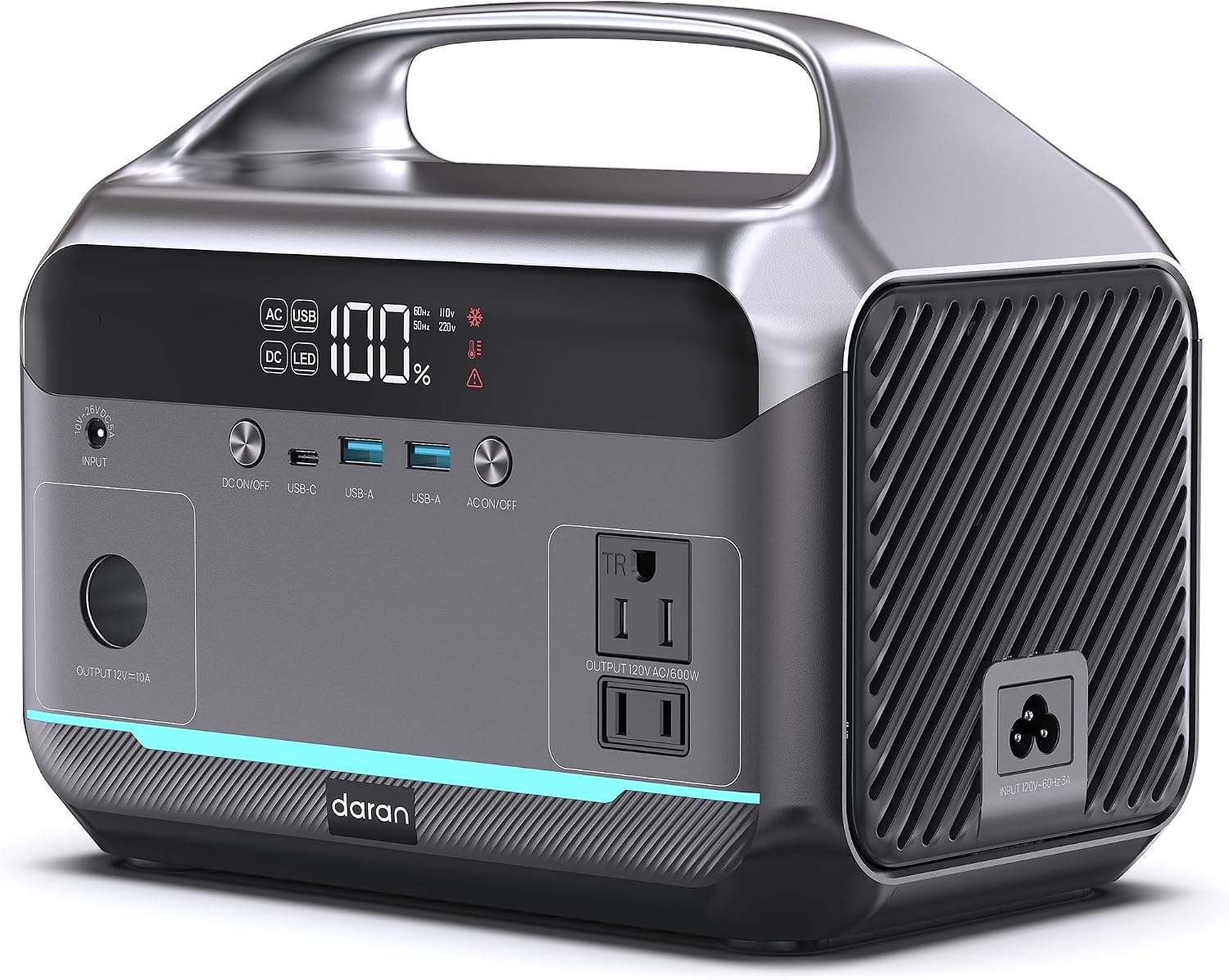
The battery base: DARAN Portable Power Station 1200W Surge, 288Wh LiFePO4 Solar Generator (Solar Optional) with 100W PD & AC Outlets, Fast Charging Battery Supply for Camping, RV, Emergency, CPAP
 Visit on Amazon →
This is the small-load base I would build a short-outage kit around. It is a 288Wh LiFePO4 unit with AC outlets, a 100W USB-C PD port, and solar input listed as optional, which is exactly the shape of a one-night backup for the load list above. LiFePO4 matters here more than any other spec, because that chemistry is what makes the box worth keeping for a decade instead of three years.
Run the math on it honestly. At 288Wh nameplate and about 85% usable after inverter losses, you have roughly 245Wh to spend. A 50W draw gets you around five hours. A 120W draw gets you about two. That is a phone, a router, a couple of lamps, and a laptop through an evening, not a fridge through a day. The 100W PD port is the part I like most, because it means one cable charges a laptop at full speed without a brick.
Flaws but not dealbreakers: The name leads with surge watts. Surge tells you a motor might start; it does not tell you what the inverter sustains. Read the full listing for the sustained rating before you plan a fridge or a pump on it. And 288Wh is a small tank by design, so treat this as a night kit, not a weekend kit.
Anyone who wants a light, grab-and-go box for phones, lights, a router, a laptop, and a CPAP through one night should start here.
Step 3: Add a fallback that runs on batteries you already own
The best backup is the one that does not need a wall to recharge. If you already own cordless tool batteries, you are sitting on a stack of stored energy that most people never think to use after a storm. A battery inverter turns one of those packs into a small AC outlet and a couple of USB ports, which is enough to keep phones, a tablet, a radio, and a light going while the big station stays in reserve for the loads that actually need it.
This is also the piece that solves the worst-case recharge problem. When the grid is down for three days, your power station is a finite tank with no pump. Tool batteries plus a car charger, or a friend's charger, or a second pack on rotation, keep the small stuff alive without draining the main unit.
Two things to check before you buy one. Confirm the battery platform matches the packs you own, and confirm the inverter output is pure sine wave if you plan to plug anything with a motor or a sensitive charger into it.
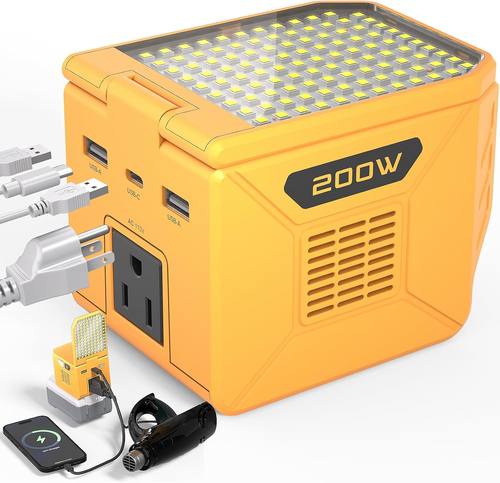
The tool-battery fallback: Power Inverter for DeWalt 20V Battery 200W (350W Peak), Portable Power Station Outdoor Generator Battery Converter with 2 USB-A &1 USB-C&110V AC & 500 LM LED Light (Tool Only)
 Visit on Amazon →
This is a compact converter that runs off the DeWalt 20V packs you already have. It gives you two USB-A ports, one USB-C port, a 110V AC outlet, and a 500 lumen LED light in one block, which covers the four things people reach for first in a blackout: a phone, a light, a radio, and a small AC load. The 200W rating with a 350W peak is a small-load ceiling, so plan on chargers, lamps, a fan, and a laptop, not a fridge.
The detail that matters most is in the name: tool only. No battery is included, so this only makes sense if you already own DeWalt 20V packs and a charger. If you do, the economics are hard to argue with, because you are converting gear you have already paid for into backup power instead of buying a second battery system.
Flaws but not dealbreakers: The output is modest, and runtime depends entirely on which pack you clip in. A compact pack gives you minutes at 200W; a large pack gives you a couple of hours at light load. Check the listing for the input voltage range and make sure your specific packs are supported before you commit.
Anyone with a shelf of DeWalt 20V batteries who wants a cheap, tiny way to keep phones and lights running should grab this before a bigger station.
Step 4: Set it up so it runs without you
Setup is where most people lose the value they paid for.
Label your cords. Tape a strip of masking tape on each device's cord and write what it draws. In the dark, with the family asking questions, you do not want to be reading tiny print.
Decide what gets priority. On a 288Wh base, priority one is light, priority two is communication, priority three is a laptop. Everything else waits.
Use pass-through charging. If the station supports running loads while it charges, leave it plugged in and switched on. When the grid drops, the small loads stay up without you touching anything. Test that behavior on a normal day by flipping the breaker, not by guessing.
Keep the unit where it stays warm. Lithium chemistry loses usable capacity in the cold, so a garage shelf at 20 degrees is the wrong home for it. A closet inside the house is the right one.
Store it at about half charge, not full, and not empty, if it is going to sit for months. Then top it up every three months. A LiFePO4 pack that sits at 100% in a hot garage ages faster than one stored at 50%.
Step 5: Test it three times before you need it
I do not trust a unit until I have discharged it at least three times. You should not either.
Run one test now. Plug in your priority loads and let the station run them down while you watch. Write down the start time, the load you put on it, and the time it hits empty. That number is your real runtime, and it will be lower than the marketing math, usually by 10 to 20%.
Run the second test with the tool-battery converter. Clip in a pack, plug in a phone and a lamp, and see how long it lasts. Now you know which pack to grab first.
Run the third test in the dark, with no lights on. This is the one that exposes problems: ports that are hard to find, a fan that is louder than you remembered, a light that is too bright for a bedroom. Fix those things now, not at 2 a.m. during a storm.
Mistakes that cost people money
Buying capacity you cannot recharge. A 2,000Wh station with no solar and no way to charge it from a car is a paperweight after day two. If the outage lasts a week, you need a recharge path, not a bigger tank.
Trusting the surge number. Surge watts are the marketing line. Sustained inverter watts are the spec that runs your gear. If a listing will not tell you the sustained rating, that tells you something.
Skipping pure sine wave. Modified sine wave inverters make motors run hot and buzz, and some chargers will not work at all. Check for pure sine wave before you buy.
Ignoring the fan. A station that whines at 200W will live in the garage instead of the bedroom, which means it will not be there when you need it at night.
Forgetting the small stuff. The 200W tool-battery converter and the 288Wh base do different jobs. One is a flashlight and phone charger that never runs out because you own six batteries. The other is the quiet box that runs a CPAP through the night. A kit with both beats a single big unit for most households.
What this all costs
I am not going to quote you prices, because they move weekly and the wrong number helps nobody. Check current Amazon price on both units and do the math on cost per usable watt-hour, which is the only comparison that matters.
What I will tell you is where the value sits. The small LiFePO4 base is the piece that runs your night loads quietly and safely. The tool-battery converter is the piece that costs the least and gets used the most, because it turns batteries you already own into backup power. If you have a shelf of DeWalt 20V packs, buy that one first.
Then run the three discharge tests, write the numbers in a notebook, and put the kit somewhere you can reach it in the dark. The grid in a mountain town goes down on its own schedule. Your job is to make sure the lights do not go with it.