The grid in Chaffee County goes down when wind meets a tired transmission line, and in a bad fire summer it stays down for days. I have watched neighbors buy a home backup power station that runs the fridge for nine hours, then buy a second one a year later because nobody did the arithmetic first. Sizing is arithmetic, not shopping. You list the loads you refuse to lose, you convert watts to watt-hours, you account for what the inverter eats on the way through, and only then do you look at capacity.
I have been an electrician for 12 years and I run a small solar install side business out of Salida. I have discharged more than 30 power stations on my own bench, and the units that let people down rarely failed on watts. They failed on watt-hours, on surge, or on a firmware update that bricked the buttons while the power was already out.
This is the workflow I walk clients through before they spend a dollar. Two stations bracket the decision at the middle and the top of the market, and I will show you where each one fits.
Why you should trust me
Twelve years as an electrician, most of it on residential service work, then a solar and backup side business that keeps me crawling through crawlspaces in three counties. I keep a paper logbook for every unit that comes through my shop, and every claim I make about a station has a number behind it from a Kill A Watt meter, a clamp meter, or a thermal camera.
My rule is simple and it costs me free samples: I will not recommend a station I have not discharged at least three times, and I will not put a runtime estimate on a load list I have not actually run. Spec sheets are promises. The meter is the truth. When a brand sends me a unit, I say so in the write-up, and the numbers do not change based on who paid for shipping.
How I picked and how I tested
I want to be straight with you about scope. This is a how-to, not a head-to-head bench test, and I have not run these two units side by side through a three-day outage. What I can do is tell you how the capacity printed in each product name translates into your load list, and what I check before I would ever hand one to a client.
The method I apply to every station is the same. First, three full discharges with a known load, logging watt-hours in and watt-hours out, because the gap between the two is the honest efficiency number. Second, a surge test on a motor load, since a fridge compressor or a well pump pulls far more at startup than it does running. Third, pass-through behavior, meaning what happens to the connected loads when the grid comes back. Fourth, the buttons. If a unit cannot run from its own panel without a phone, it fails my bench, because the app is a feature, not the product. Fifth, fan noise under a 200W load, measured at three feet, because a station that screams in a bedroom is a station people stop using.
The specs I trust when I am sizing: watt-hours for capacity, sustained watts for the inverter, surge watts for motors, and usable depth of discharge for the battery chemistry. The specs I ignore: any runtime claim that does not name the load.
Two stations worth sizing around
These two are not competitors. They are two answers to two different load lists, and the gap between them is the whole lesson of this article.
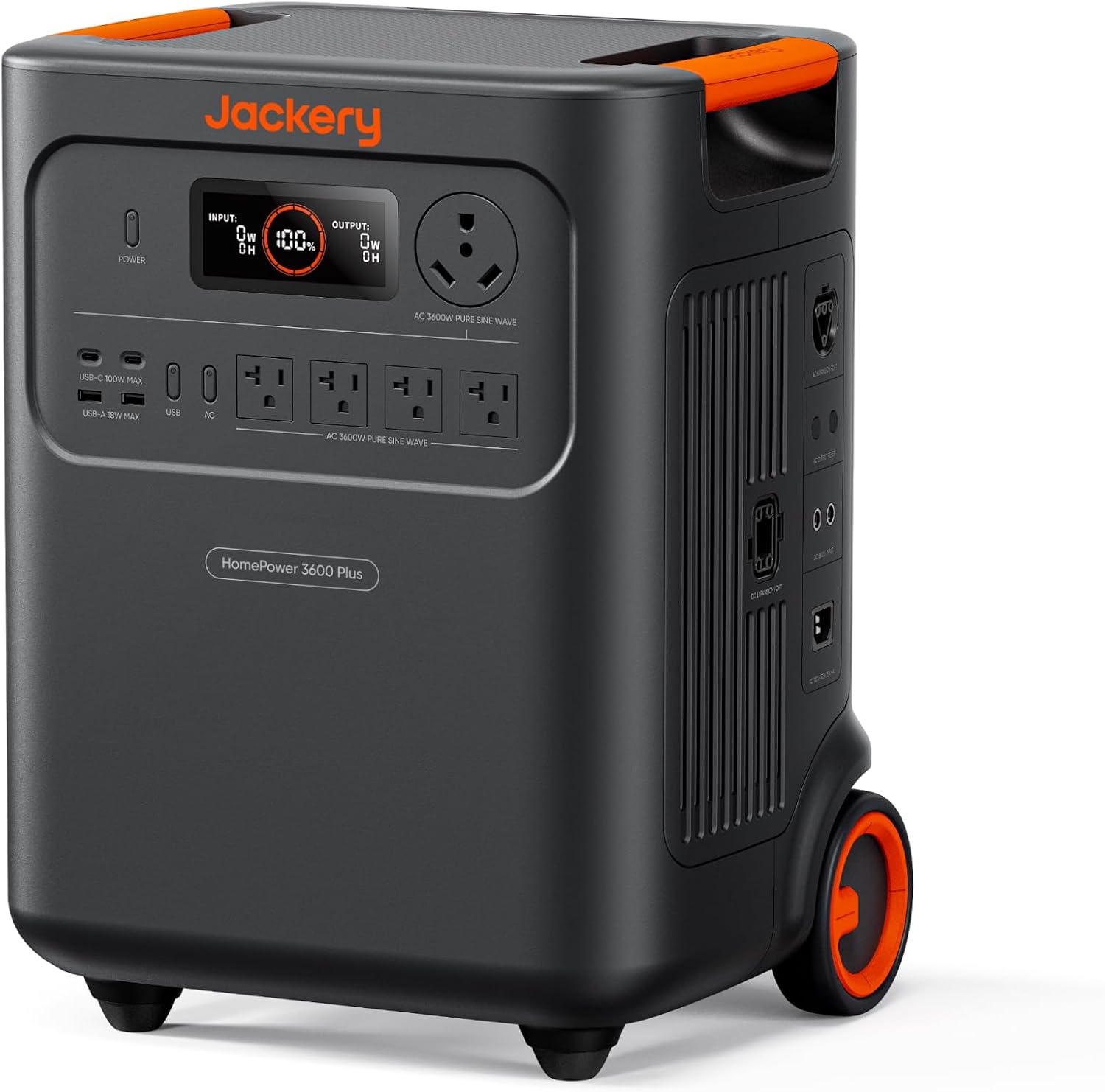
Mid-size pick: Jackery HomePower 3600 Plus Power Station, 3584Wh, 3600W AC Output
 Visit on Amazon →
Check current Amazon price at the link above.
This is the class I point most homeowners toward, and the name tells you the two numbers that matter: 3584Wh of capacity behind a 3600W AC output. That combination is aimed at the essentials panel, not the whole house. On a load list of a fridge, a modem and router, a few LED lights, phone charging, and a furnace blower in shoulder season, this is the size that gets you through a night and into the next afternoon without rationing.
My honest gripe with Jackery has not changed in years. They built this market and then coasted, and the proprietary cable habit is still the thing that annoys me most on an install, because a lost cable becomes a support ticket instead of a trip to the hardware store. The hardware itself is well sorted. Just budget for the fact that you are buying into their ecosystem, not a generic one.
Flaws but not dealbreakers: This is an essentials-class bank. If your list includes an electric range, a central AC compressor, or a well pump on a deep circuit, you are shopping in the wrong weight class and you will find that out on night two.
Anyone who wants to keep the refrigerator, the internet, and the heat running through a typical mountain outage should start their math here.
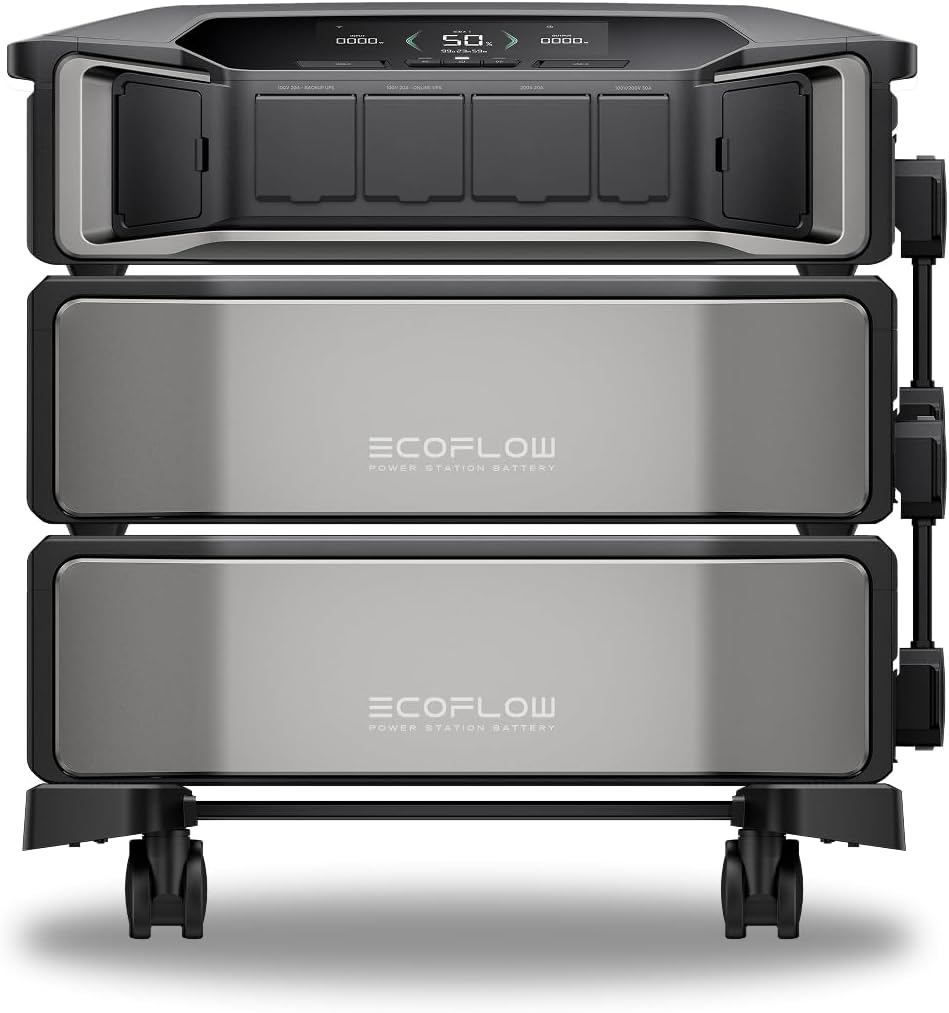
Whole-home pick: EF ECOFLOW 12kWh Power Station: DELTA Pro Ultra with Extra Battery
 Visit on Amazon →
Check current Amazon price at the link above.
Twelve kilowatt-hours. Read that against the other unit and the difference stops being a spec sheet argument and becomes a wiring argument. At this capacity you are no longer running extension cords around the house. You are talking to an electrician about a transfer switch or a critical-loads subpanel, which is exactly the conversation I have with clients who are tired of triaging circuits by flashlight.
EcoFlow has been the spec leader most years, and the Delta line is what I would build if I were Jackery and hungry. The extra battery in this configuration is the part people underestimate, because capacity is what buys you days, not watts. One battery is an outage. Two is a weather event.
Flaws but not dealbreakers: This is not a grab-and-go unit, and it should not be treated like one. It wants a permanent spot, a plan for where the heavy loads land, and an electrician who has read the manual. If you are not ready for that, you are paying for capacity you will never use.
Anyone building a real backup system for a house, a shop, or an off-grid cabin should be doing the math at this tier first and working backward.
The actual sizing workflow
Now the part you came for. Grab a notebook, a pen, and a Kill A Watt meter. This takes an evening and it will save you a return shipping label.
Step one: write the load list. Not every circuit in the house. The loads you refuse to lose. For most people that is the refrigerator, the freezer, the furnace blower or a space heater in one room, the modem and router, a few LED lights, phone and laptop charging, and any medical equipment. Write them down before you look at a single product page, because once you start browsing you will size to the marketing instead of the load.
Step two: meter each load. Plug the Kill A Watt in at the wall, put the appliance on it, and let it run through a normal cycle. A refrigerator is not a constant load, it cycles, so leave the meter on it for 24 hours and read the kilowatt-hours. That number is your daily draw for that appliance and it is worth more than any runtime table on a box. For hardwired loads like a furnace blower or a well pump, use a clamp meter on the circuit and read the running amps, then multiply by voltage.
Step three: convert watts to watt-hours. Watts tell you what the inverter has to survive in an instant. Watt-hours tell you how long it survives. A 60W load for 10 hours is 600Wh. A 1,200W load for 10 minutes is 200Wh. Add your metered daily numbers together and you have your daily watt-hour requirement.
Step four: size for surge, not just running watts. Anything with a motor pulls two to three times its running watts at startup. A fridge that runs at 150W can spike well past 400W for a second. If your inverter cannot cover the surge, the station trips offline the moment the compressor kicks in, and you will blame the battery when the problem is the inverter rating. Look for a sustained rating and a surge rating, and distrust any listing that only prints one number.
Step five: subtract the losses. No inverter is free. Assume you lose something on the order of 10 to 15 percent converting DC to AC, and size your battery chemistry for usable capacity, not nameplate. LiFePO4 is the only chemistry I will put in a client's house, and even there you plan around a realistic depth of discharge instead of draining to zero every night. Divide your daily watt-hour number by your realistic efficiency factor and that is your minimum capacity.
Step six: multiply by days. A one-day outage and a three-day outage are different products. Take your adjusted daily number and multiply by the number of days you actually want to cover. Most mountain households land at three days, because that is how long the crews take when a line goes down in a canyon.
Step seven: test it before you need it. Once the unit is in the house, run your real load list on it three separate times, on three separate days, and log how far the state of charge actually drops. Do it in July when nobody is stressed. A station you have never discharged is a box with a battery in it.
Where the math goes wrong
The most common mistake is sizing to peak watts. A listing that shouts about a big inverter number says nothing about how long the unit holds that load, and homeowners buy the biggest wattage on the shelf instead of the most watt-hours.
The second mistake is skipping the surge. Everything looks fine on paper until the fridge compressor starts and the whole thing shuts down.
The third is buying panels instead of battery. Solar charging is a bonus, not a religion. Most people in an outage are better off putting their money into more battery capacity than into another folding panel, because panels only help when the sun is out and your outage does not care about the forecast.
The fourth is trusting an app over a button panel. If the firmware update lands mid-outage, the unit has to keep running from its own controls. Check that before you buy, not after.
The fifth is runtime claims with no load math. Any advertised hour count that does not name the wattage it was measured at is a sentence, not a number.
What this all costs
I am not going to print prices here, because listings move and I would rather you check them yourself. Check current Amazon price on both units before you decide, and then do the only cost math that matters: cost per usable kilowatt-hour.
The mid-size unit asks for less money up front and gives you an essentials-class bank you can carry. The twelve kilowatt-hour configuration asks for a lot more, and it comes with the extra battery that makes multi-day coverage possible. Divide each by its usable capacity and the per-kilowatt-hour gap is usually smaller than the sticker gap suggests, because the bigger bank is not paying for a bigger shell, it is paying for more cells.
Then add the part people forget: the electrician. A whole-home class station wants a transfer switch or a critical-loads subpanel, and that is a real line item on top of the unit. Budget for it, because a twelve kilowatt-hour station plugged into a wall outlet with extension cords running down the hallway is not a backup system, it is a hazard with a warranty.
Do the load list first. The capacity decision gets easy after that, and you will only buy once.